# Make a drum machine that sounds good
> Ask Vibes DIY for a drum machine and you get a sixteen-step grid with a punchy kick, a snappy snare, hats that cut each other off like the real thing, swing and a grit control. It plays on the first tap, and you can save the groove and send the link to your drummer.
Source: https://good.vibes.diy/blog/make-a-drum-machine-that-sounds-good
Published: 2026-11-14
Picture a teenager in a garage band who wants a beat to rehearse against. They
type one sentence into Vibes DIY:
> Make a drum machine for my garage band. Sixteen steps, a punchy kick, a
> snappy snare, hats, swing and a grit knob. Let me save grooves so I can send
> one to our drummer.
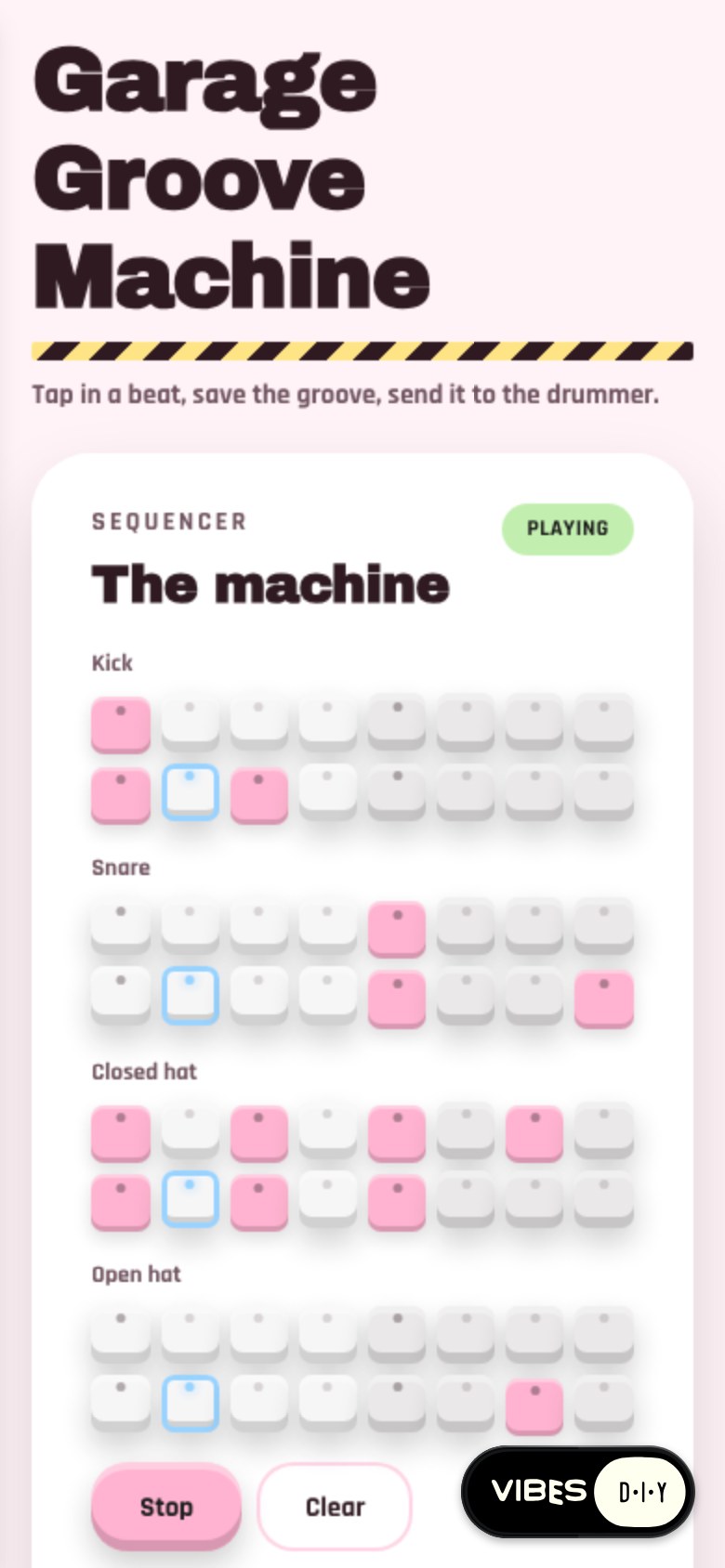
Shortly after, they have a drum machine with its own link. They tap Play and it
plays, right there on the phone, with nothing to download. The kick thumps, the
snare cracks, the hats tick along, and a light walks across the grid in time
with what they hear.
The drum machine that sentence built, mid-groove on a phone. The blue ring is the step you are hearing. Open it and press play.
That is the whole post, really: ask for a drum machine and you get one that
sounds good from the first tap. The rest is what is in it, why it sounds the
way it does, and what to ask for next.
## What you get
- **A sixteen-step grid** of square pads in groups of four for kick, snare,
closed hat and open hat. Ours came out as one row per drum; another build
might lay the steps out as an MPC-style pad grid or a rack of units. Sixteen
across on a laptop, eight a line on a phone. Tap a pad to turn a step on.
While the beat is stopped, the tap plays that sound, so you hear what you
placed.
- **A light that follows the sound.** The lit step tracks what is reaching your
speakers, so the grid and the groove line up.
- **Tempo and swing.** Push the swing up and the off-beats lean late, the way a
drummer lays back.
- **Grit and volume.** Grit warms the whole kit up, then pushes it into crunch
as you turn it. It changes the colour of the sound without making it louder,
so you can ride it like a mixer while the beat plays. Volume sets the level of
the whole kit from inside the app.
- **Saved grooves.** Sign in and save a beat with its tempo, swing and grit.
Everyone who opens the app can play and load the saved grooves, so the band
shares one shelf of beats.
Our sentence asked to send a groove to the drummer, so the build gave every
saved groove its own link: the drummer opens it and the machine loads that
exact beat, ready to play. Ask for what your band needs and the app grows to
fit it.
## Why it sounds good
Every sound is made in the browser from scratch, out of tones and noise, which
is why there is nothing to download and why it plays on the first tap. Four
choices give it the sound of a real drum machine:
- **The kick drops in pitch** as it hits, fast, then settles into a low tail.
The drop is the punch and the tail is the boom. A tiny click on top is the
beater, so the kick comes through on phone speakers too.
- **The snare has a body and wires**: two tuned tones for the drum shell under
a burst of noise, brightened at the top.
- **The hats use the 808 recipe**, six metallic tones stacked at odd ratios and
filtered high. A closed hat cuts off a ringing open hat, the way it does on
the real machine.
- **The whole mix runs through one bus** with the grit and volume on it, and a
last-stage limiter that keeps a big groove clean and loud.
Every drum machine, beat maker or groovebox you ask for now starts from that
kit and grows from there: more sounds, more steps, accents, banks of patterns.
The whole kit is written out in the [web music
reference](https://good.vibes.diy/docs/reference/web-music), if you want to read the recipe.
## Make it look like an 808
Every drum machine is built with an instrument face: one panel that holds the
pads, the knobs and the transport, so it reads as a machine you could pick up.
Name a machine and the face wears it. Say "make it look like an 808" and the
pads, the panel and the step lights take on the machine, painted in your app's
colours. "An MPC", "a vintage beat box" or "brushed metal" work the same way,
and picking a new look repaints the whole machine. The pads, knobs and grid
keep working the same, so it plays exactly as before in its new look. The
[reskin reference](https://good.vibes.diy/docs/reference/reskin) shows how a look is applied.
## Things to ask for
Start from a sentence and keep going:
- "A drum machine for practicing along to, with a big tempo readout."
- "A beat maker with a cowbell and a clap, and three pattern banks."
- "Make it look like an 808."
- "Add a button that randomizes the hats."
- "Add a fill button that plays a snare roll into the next bar."
Each one is a follow-up in the same chat, and each change lands on the same
link your band already has.
Make your band a drum machine
One sentence gets you a beat that plays on the first tap.